Showing posts with label text file as SSRS data source. Show all posts

Friday, 8 November 2019

How to join two CSV files for SSRS Reporting


How to join two CSV files for SSRS Reporting - Part 2


SSRS report with Inner joining two CSV files

   My recent article has covered “How to Use CSV file as DataSource for SSRS reports”, however one of the reader posted a question on that article, how to join two CSV files, i found it interesting hence i came up with this new article.

Joining two CSV files are as similar as joining two SQL tables, but there is a small syntax difference, consider this article as second part of previous article How to Use CSV file as DataSource for SSRS reports” for better understanding on CSV as data source.

  • First we will see the source data, i have created 2 CSV files with sample data of Mutual Funds and Asset Value,  with common ID for Joining 2 data source.
      • Fund_groups.csv 
ID,Fund_Family,Fund_Family_Sub_Group,Line_Item,SubScript
1,SBI Blue Chip,SBI Blue Chip G,Received from General Partner,1
2,SBI Blue Chip,SBI Blue Chip N,Withholdings taxes,2
3,SBI Blue Chip,SBI Blue Chip O,Received from Distributed General Partner,3
4,DSP BR Micro Cap,DSP BR Micro Cap G,Received from General Partner,1
5,DSP BR Micro Cap,DSP BR Micro Cap N,Withholdings taxes,2
6,Birla Sun Life,Birla Sun Life G,Received from General Partner,1
7,Birla Sun Life,Birla Sun Life N,Withholdings taxes,2 
      • Fund_Assets.csv 
ID,Total_Fund_Asset
1,10000000
2,1500000
3,8000000
4,40000000
5,41000000
6,4000000
7,4500000 
  • Next querying those 2 data sources, and using it in SSRS reports, for this we need to use OLEDB Driver to establish connection.  (Provider=Microsoft.Jet.OLEDB.4.0;Data Source="C:\CSV Source";Extended Properties="text;HDR=YES;FMT=Delimited")
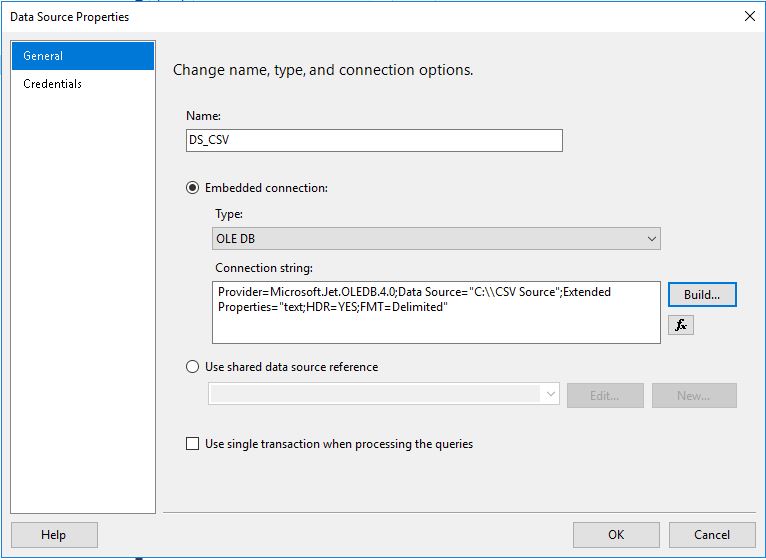


  • Write an ANSI SQL to join 2 CSV files, use complete file name as Table, we can use any joins Inner, Left, Right or Full Outer join, below is a sample query.
SELECT   fg.ID, fg.Fund_Family, fg.Fund_Family_Sub_Group, fg.Line_Item, fg.SubScript, 
fa.Total_Fund_Asset  
FROM Fund_groups.csv fg
INNER JOIN Fund_Assets.csv fa ON fg.ID = fa.ID


  •      Now we got report data set, use it for report development, we can use any csv file no matter how large it is, joins will work. 


This is how we can join 2 different csv files using ANSI SQL. please leave your comments, messages, feedback, thank you


Friday, 2 December 2016

How to use CSV file as Data Source in SSRS Report

How to use CSV file as Data Source in SSRS Report


SSRS report with CSV Data Source

  In one of our development scenario I got requirement to develop one functionality of SSRS report from CSV Data source, I did searched online but, didn’t get proper article with easy steps, then I thought to write this article for all developers who are searching for CSV as a SSRS report Data Source


  • Add new report, when you are creating data source select OLE DB Driver, and click Edit button.

  •          Select “Microsoft.Jet.OLEDB.4.0” driver and give only your file path, check Test Connection, after Succeeded hit ok, ok, Or copy paste this connection string            Provider=Microsoft.Jet.OLEDB.4.0;Data Source="U:\\SSRS CSV Source";Extended        Properties="text;HDR=YES;FMT=Delimited"
  •  Create Data Set and write your query as shown below, don’t keep space in between your file name   Select * from Fund_groups.csv  


  • You can also write Where conditional and filter CSV records, @Fund is report parameter,   SELECT  * FROM Fund_groups.csv  where Fund_Family in (@Fund)  This works in Query Designed

 But this won’t work in report execution, see below error message ,for multi value with where condition.
(It Does not support by Data extension)

  • Solution for this is, Filter records on Data set, remove (0) from parameter                                       Eg.  Parameters!Fund.Value(0) use only Parameters!Fund.Value SSRS takes multiple values internally

   
  • Now your report is ready, 


This way you can achieve csv as a data source,
we can also join 2 CSV files and use as data source for SSRS reports, please see this new article
"How to join two CSV files for SSRS reporting"

please leave your message, comments, feedback. Thank you!